Starved at 20% CPU
Sep 30, 2026
Preface
For a long time, ever since I was introduced to logic circuits and Boolean algebra, I truly believe that nothing happens unpredictable in a digital system. Throughout my career, I’ve faced unexpected results from a digital circuit and doubt my belief. But soon enough I’ve found the real logic behind that behavior. And that thought of unpredictable outcomes was because of my own lack of knowledge and data.
Nowadays whenever I see an unexpected phenomenon, the first thing I think about is that I don’t have enough clues to explain this output, rather than gazing at it and be amazed.
A few months ago, right before moving from SRE team to my this new team “Offering” at Snapp! we’ve faced an unexpected behavior on the primary service of the team. As an SRE we should have been able to find its root cause and mitigate it. Also as a new joiner to the “Offering” team I should’ve been able to deeply diagnose the services to finally explain it.
This is the story of the journey we took to fix an issue that was there before even I joined Snapp!. This was a joint task-force of multiple teams so I’ll use the word “Us” for all the work done by colleagues.
Background
We have a secondary production environment, isolated from the primary one but only sharing the application code bases. The infrastructure, app configurations, everything is different in this environment. Let’s call it B as in Beta.
One of the most important services we have in the “Offering” team is an event-driven stateless service consuming different kinds of events and in the response, publishing new other events including the Offer event sent to the client applications. Let’s call it G as in Gamma.
Every event driven application can be categorized in two groups:
- Event-at-a-time processing: consuming events and processing them as soon as they arrive with no latency. But with more overhead since a database query or network call will happen per event.
- Batch or micro-batch processing: collecting events into groups and processing them at once. The batch closes when it reaches a size limit, a time window, or both (for example, “500 events or every 8 seconds, whichever comes first”). Far less overheads but with slightly more latency on processing events.
G works in both ways, all events are consumed one by one, decided whether processing them immediately and publish to the event-at-a-time component queue called F as in FIFO or batch them and fire a delayed trigger event to this batch processor called P as batch Processor.
Index Case
On 21st June, 2026, we detected very high latency on the external service calls of the G service in the B environment after a deployment. The Kubernetes pod rollout was paused since the issue was detected. Since we didn’t have much effect on business because of that one single pod, we decided to keep that one pod alive until we find its issue.
A few days before that, we had CPU throttling of those pods because of a wrong configuration of their CPU quota limit. So the first thing we checked was CPU throttling metrics. None was seen.
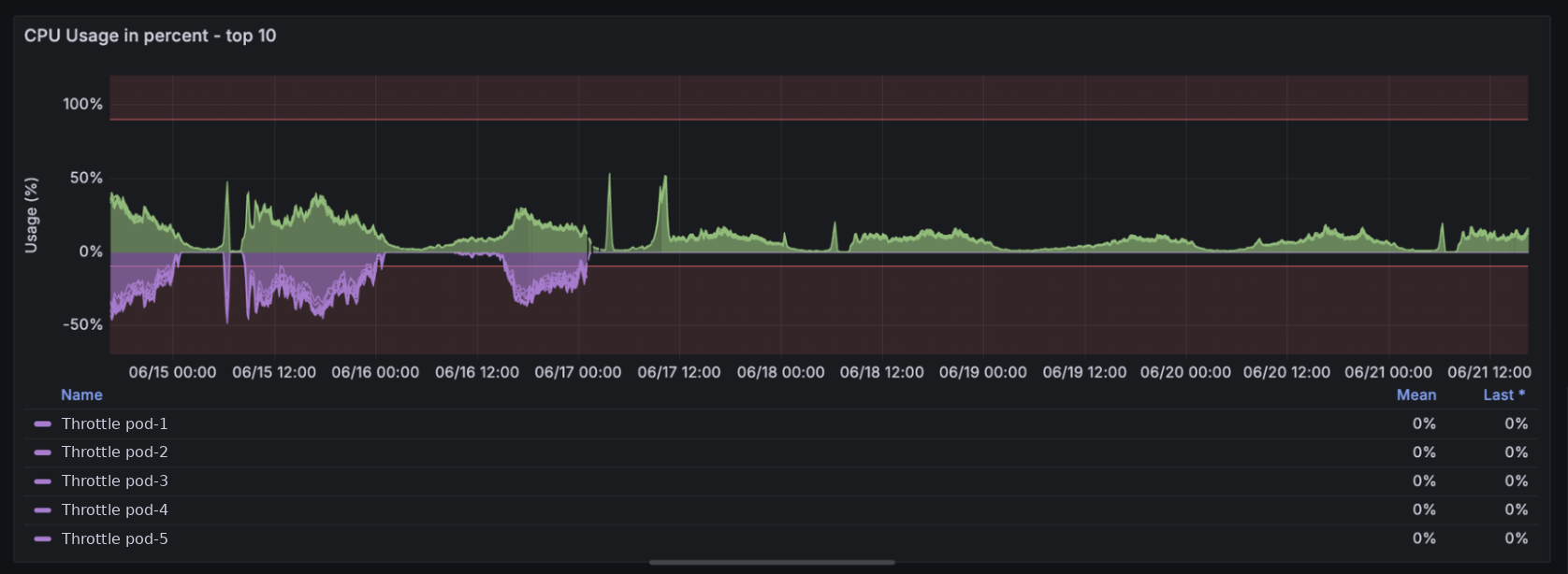
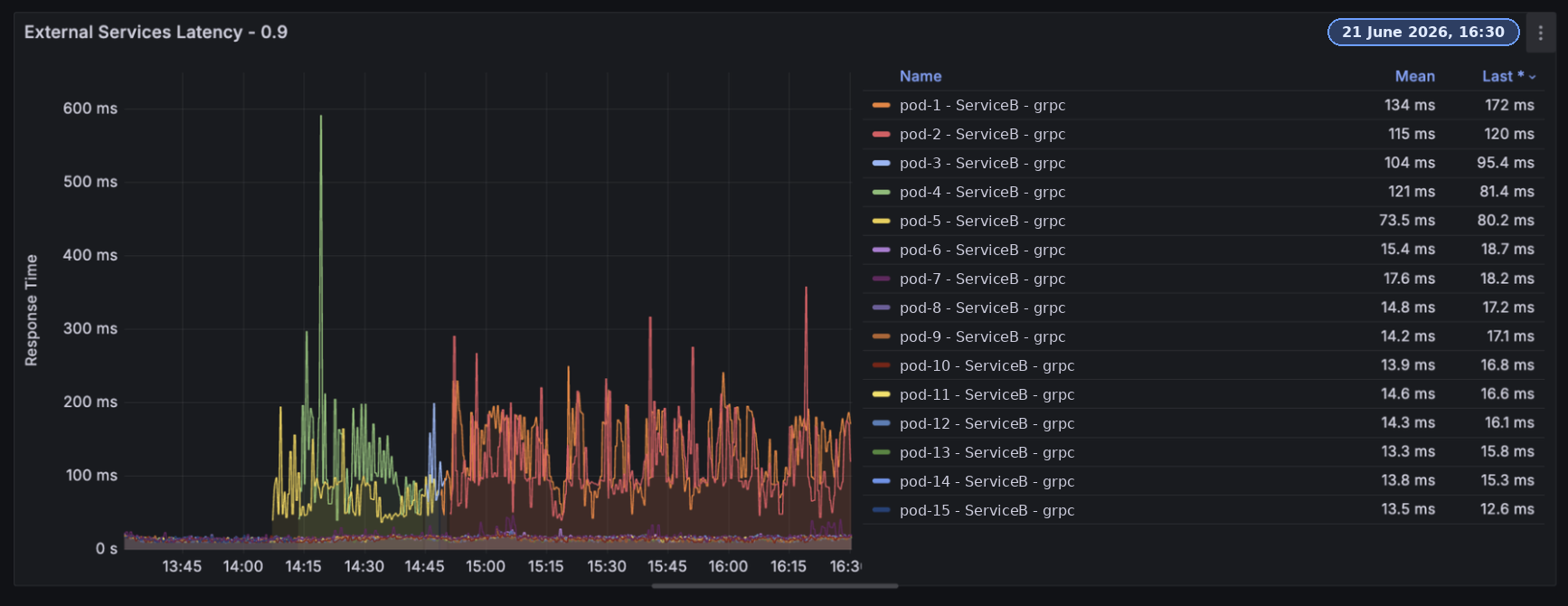
After we checked a couple of possible causes, we decided to revert the changes. While the deployment was just a simple change of configuration, we reverted the change to make sure it was not the reason of this failure. The rollout was reverted, and the new pods with the previous configuration had the issue too.
In this situation, you think of a difference in the infrastructure, maybe Kubernetes worker nodes, or even an application configuration. We deeply checked everything, and nothing was found.
We stopped searching and decided to wait to get more clues. Until an incident happened somewhere else that caused the flow of the events consumed by G. After the incident, the same pods of G, with no changes or restarts, fixed themselves, and their latency was a flat line near zero. No related change or action was detected that could’ve fixed the issue.
The next day, a deployment was required. It was a fresh pod rollout, and the problem showed itself again. Still no clues as to what was happening. We checked CPU profiling, found some improvements we could have and we decreased a lot of CPU and Memory consumption but the real issue was still there, wasting a lot of CPU. While the CPU utilization was lower than 20 percent, lowering the CPU limit quota was leading to a worse condition.
This was the strongest clue so far. When you lower the CPU limit quota, what happens under the hood is that the Go runtime detects the integer number of cores configured on the CFS bandwidth control (cgroups) and sets the number of Go runtime processors to that number. This is because of an issue detected by Uber and described here. So, a lower CPU quota limit means fewer Processors. You can find more details about the Go runtime scheduling model called G-M-P here. This simply means we need more CPU. But why is CPU utilization not 100%? We’ll get to this later.
Already Everywhere
While we were checking everything in the B environment, we found out that this issue resides in the primary environment too, on both F and P workers. But it was an accepted condition, as it had always been there. The reason why this effect was starting to show itself now in B is probably the increased business load.
This is an example trace of G’s work when calling other services in the primary environment.
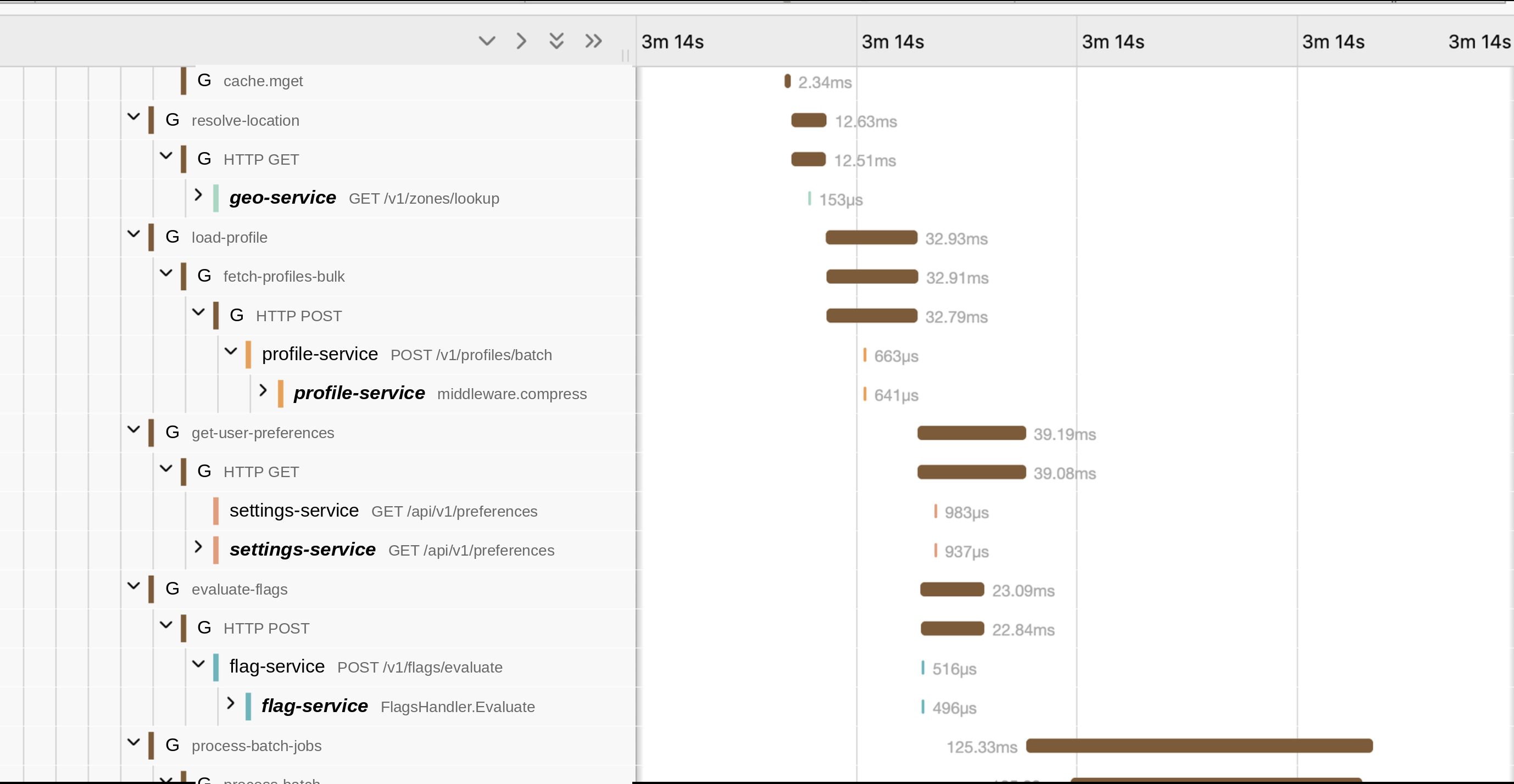
You can see an excessive delay from the starting point of a parent span and its child spans. Even at the end of the spans. One thing correlating with this latency was encoding/decoding the payloads. External services having no request payload body (just a query param in the URL) had almost no margin with their parent service spans. And this latency is really severe. An API call was responded to in less than 1 ms, but it was taking more than 30ms for the G service to make it. Explaining the real latency we see in the external service call and process durations.
One more important clue was that, while examining these traces, we saw that this effect is not seen in some of the traces. It was all ok for a pod for a short period. until it starts again. and it was switching back and forth.
Go runtime overheat

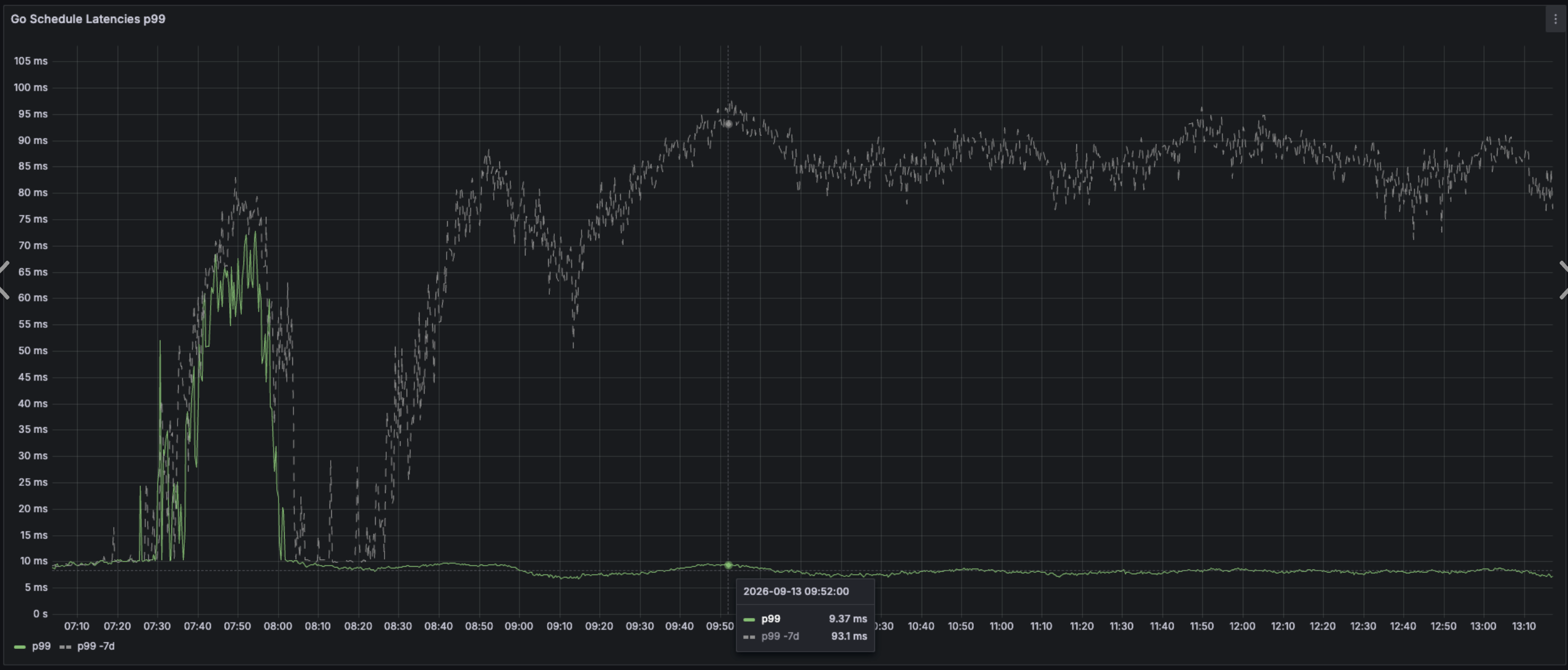
During the Go runtime metrics examinations, we saw an unbelievable picture. The go_sched_latency_seconds metric was off the charts. This metric measures how long a Goroutine was waiting for a processor to pick it up while staying in a Runnable state. Pay attention to the Runnable state. It doesn’t mean how much a Goroutine was waiting for blockers or channels; the goroutine was already unblocked or received from or wrote to a channel, and now it was waiting for CPU. Any number higher than 1 ms is a warning, and higher than 10 ms is a disaster. Very high scheduling latency can lead to overtime CPU-intensive function call durations. A job that can be done in less than a few milliseconds may take up to hundreds of milliseconds or a second.
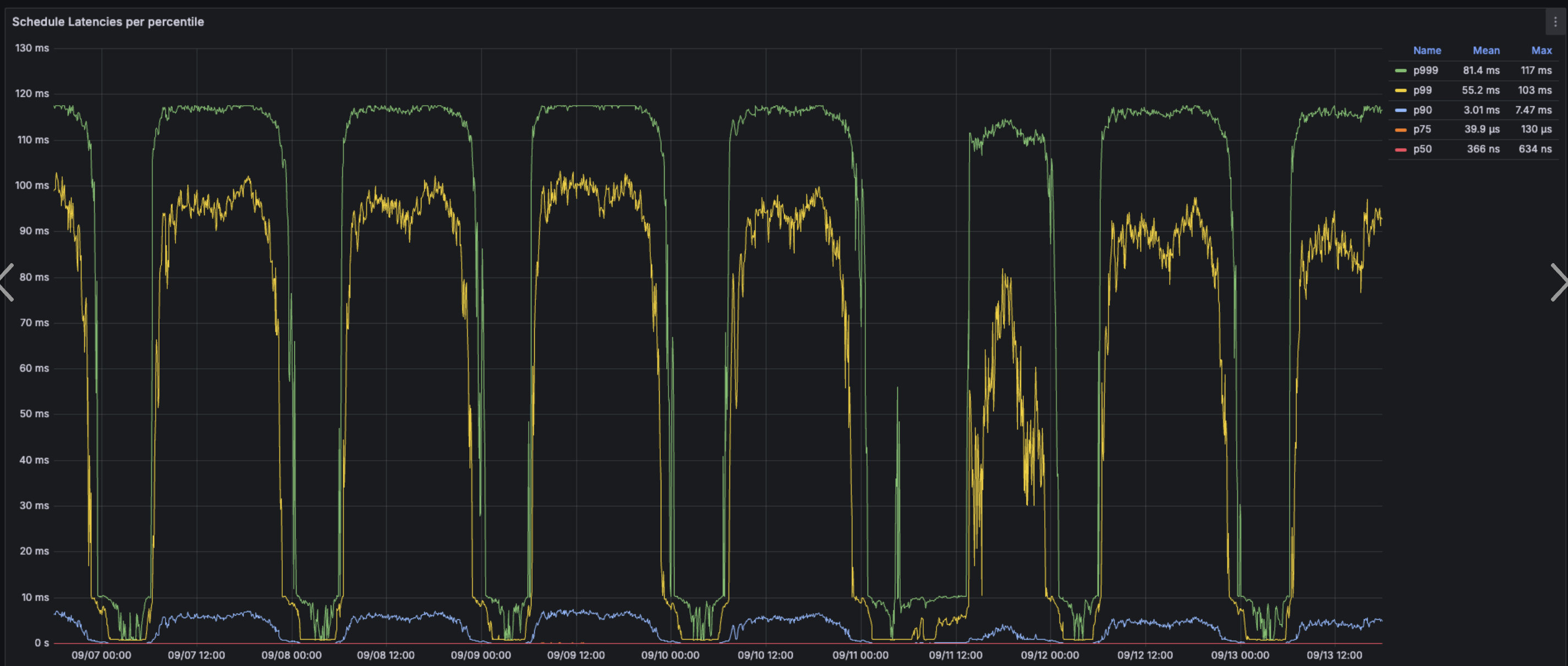
This metric strongly proves that we’re having CPU pressure. But remember that we didn’t have much CPU utilization. So we took a closer look using Go pprof.
Go runtime pprof
We took 30 seconds of pprof of one of the production pods on the primary production environment at the business peak time. And this was the result.
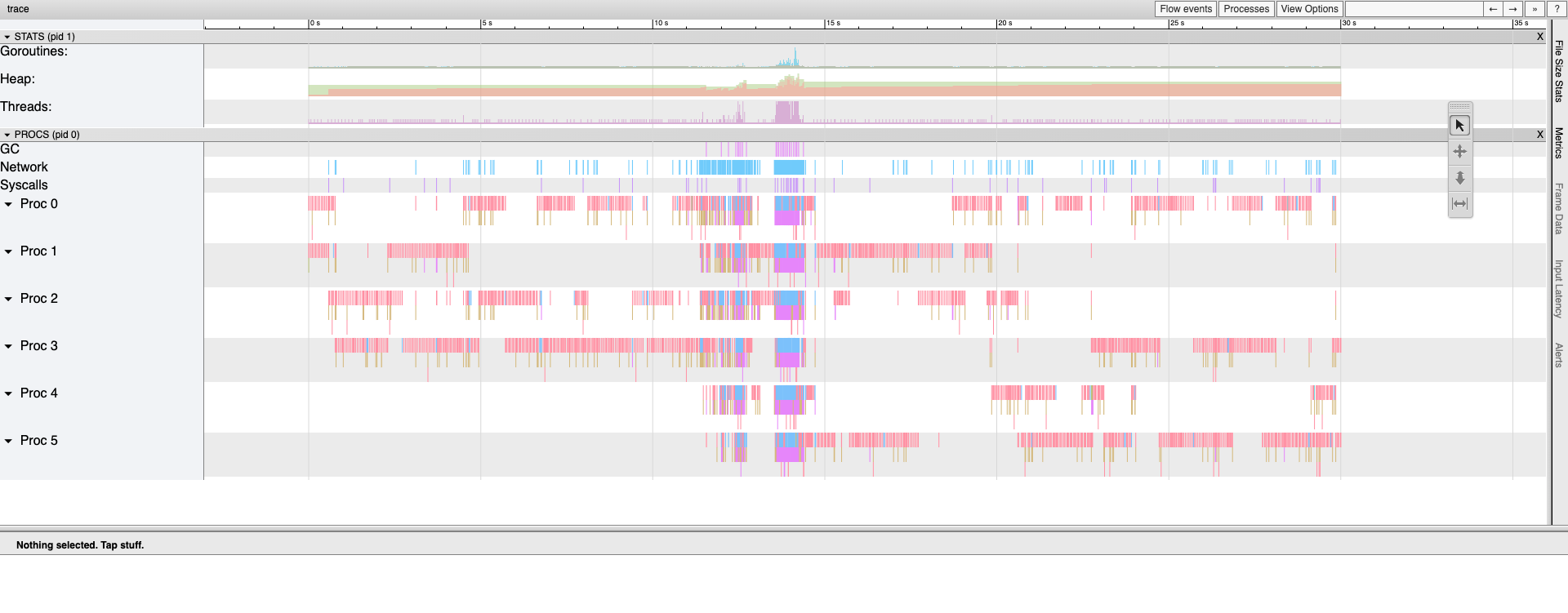
It clearly shows that during a relatively long duration (30s), the pod is mostly idle, doing nothing but some background housekeeping jobs like connection pool pinging and keep-alives. But suddenly, a thundering herd of work comes along. Here you can see the zoomed view on the short duration of high work load time.
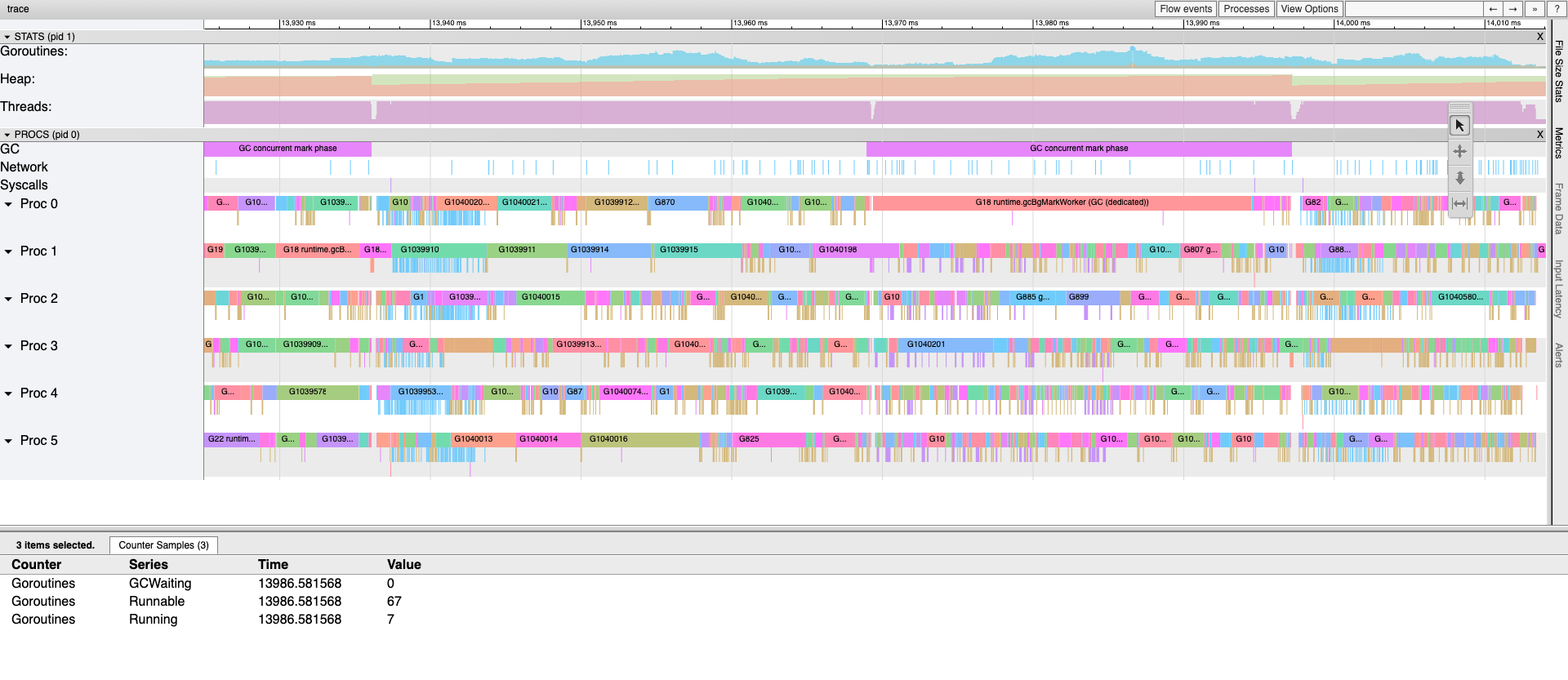
A couple of important notes:
- The first row shows the number of goroutines in different states, but only the runnable state is seen in the image. And the number is so high. 67 goroutines are waiting for a processor at timestamp of 13s 986ms, while only 7 are working. It’s because we have only 6 Go runtime processors on this pod with a 6-core CPU limit quota.
- The number of active threads is a flat 6. The bottleneck doesn’t allow more jobs to be done more quickly. This is the state where having more CPU cores could help us.
- The number of goroutines is too high, even though they’re so small and tiny. This is the real reason why go_sched_latency is so high. Hundreds of goroutines are ready to be executed while the other 7 are still running. Even though they will finish their work soon, we still have a pile of work pending.
Root Cause
The pprof file contains all the goroutine executions. We used LLMs to quickly write a tool to analyze this pprof file and mark the start and end of the event processing. Not surprisingly, we saw the start of processes right before and during the work storms we detected on pods. But what caused this issue? We wrote another script to take pprof on all pods simultaneously and plot the graph. And this was the result that led us to the root cause:
Clearly, it shows an unfair distribution of work across the workers. Actually, it’s fair, but a large amount of work is assigned to one worker, causing momentary CPU starvation while other pods are idle. It was because of a bad configuration of consumer registration in RabbitMQ. The workers were registering 100 consumers when the pod initialized, so RabbitMQ was assigning 100 consecutive work units to a single pod, then moving to the next one. Reducing the number of consumers on each pod to only 1 fixed the issues. Making the work distribution “round-robin”. So, if we increase the work load of the previous animation we had, you can see the difference of these two set of configuration:
After fixing the configuration and fully rolling out the pods, this was the same sampling tool result we’ve seen before:
The Results
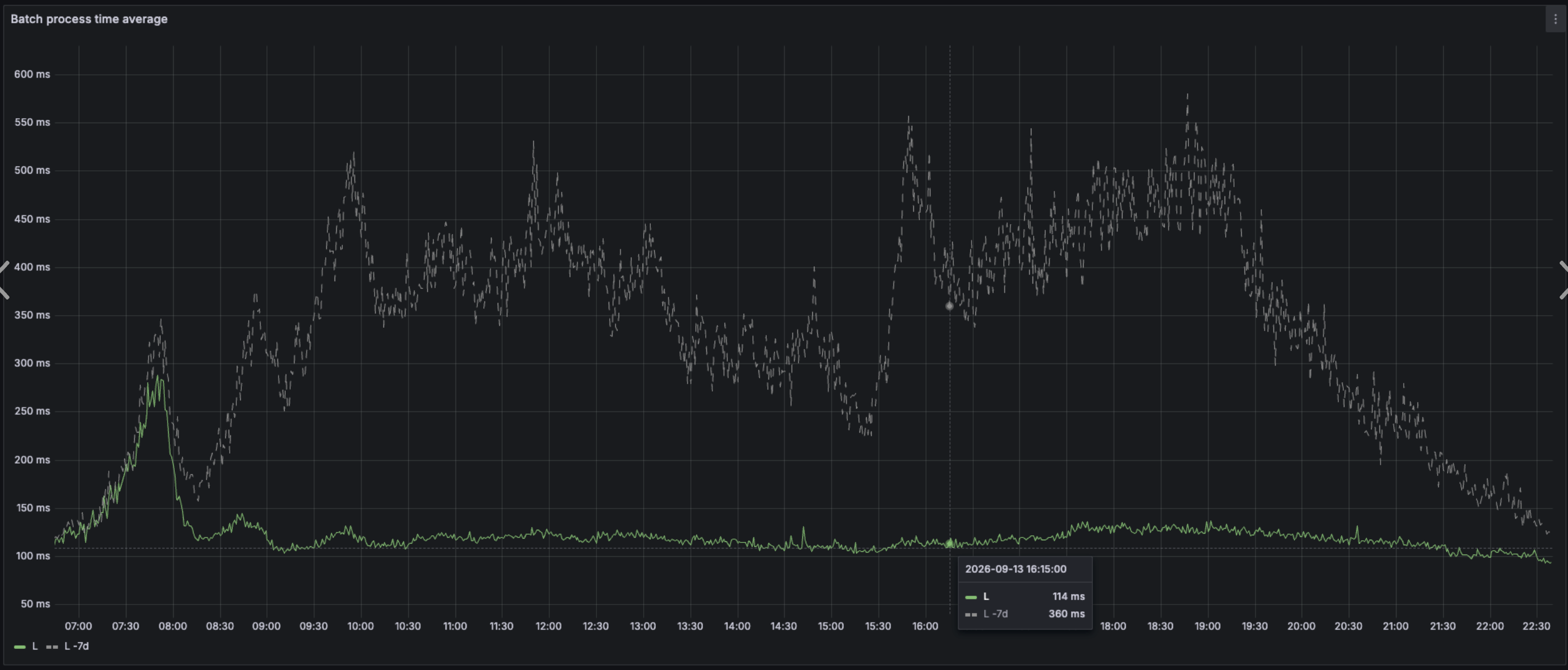
This is the p99 and average batch process time comparing with its last week. The fix was deployed 8 AM in the morning:
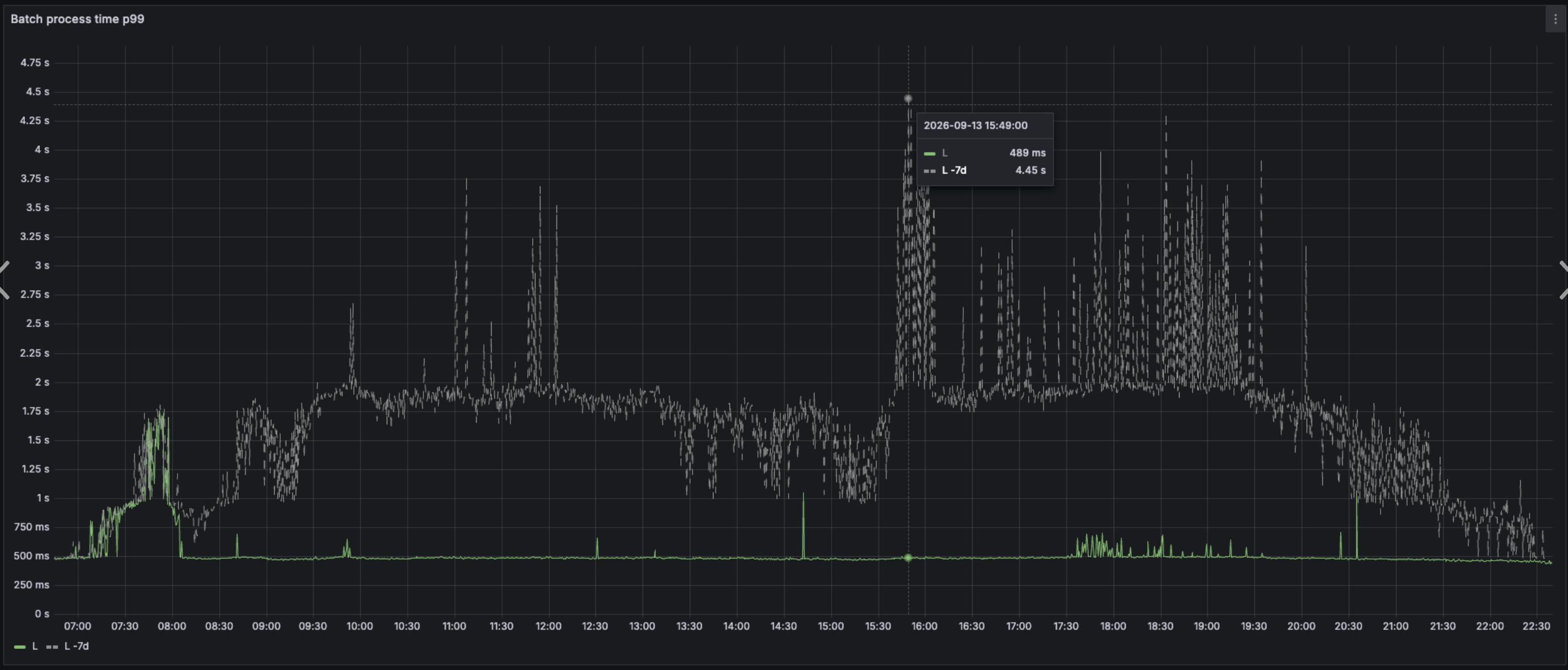
And the go_sched_latency_seconds p99 the day issue fixed: